Modeling Your App
Learn how to architect your WorkOS integration
Every application has a unique set of authentication and authorization requirements. Before writing integration code, it helps to understand how WorkOS concepts – users, organizations, authentication methods, and sessions – map onto your application’s architecture.
WorkOS supports a range of scenarios, from simple B2C user authentication to complex B2B architectures with multiple organizations and authentication policy enforcement. Features are designed to grow with your application, so you can start with basic authentication and expand as you onboard larger enterprise customers. This page covers the terminology, describes common B2C and B2B flows, and walks through scenarios that explain how everything fits together.
Supporting Email + Password, Single Sign-On, OAuth, Magic Auth, and other authentication methods independently is a complex task. It requires understanding the authentication process, modeling sign-in and signup interfaces, and handling all possible routes, error states, and edge cases.
There are three main ways to add WorkOS authentication to an application:
A hosted login solution that provides a customizable UI and supports a wide range of authentication methods.
If you prefer to craft your own UI in your own stack, you can use the AuthKit APIs directly.
For applications that are only interested in SSO capabilities.
In the majority of cases, the hosted AuthKit solution is recommended.
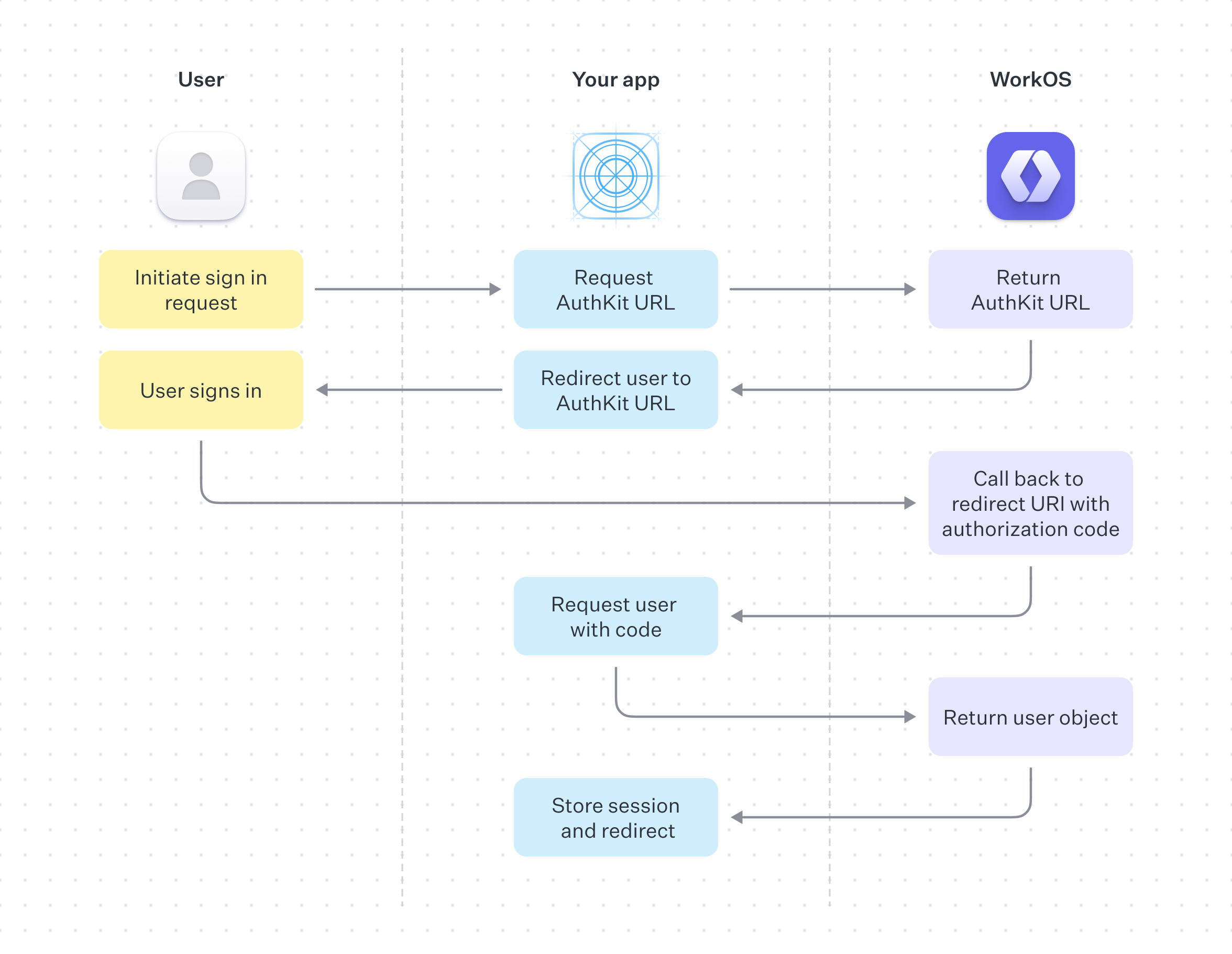
On successful completion, AuthKit will return an authentication code to your application via your specified redirect URI, this is exchanged for the user object and used to create a session.
See the Quick Start guide for more information on how to implement this.
Before building an integration, it is useful to consider which authentication methods the application requires. Typical consumer authentication methods include the following:
The most common method of authentication, users sign up or sign in to your app with email and password. This method is enabled by default.
OAuth, also known as Social Login, is when a user logs in with an account belonging to a different service. Examples include logging in with your Google, Microsoft or GitHub account instead of making a new account with your app. These authentication methods can be configured from the WorkOS dashboard.
Also known as Passwordless, Magic Auth authentication works by emailing the user a unique, one-time-use 6 digit code which they then use to authenticate.
A similar technique is Magic Link, where the user logs in by clicking a link emailed to them. This method has proven unreliable because IT teams often employ security measures that scan user emails and programmatically click links, invalidating the Magic Links. WorkOS has deprecated Magic Links in favor of Magic Auth.
The favored authentication method by enterprise sized companies, SSO allows an organization’s users to sign in with a single ID to related, yet independent software systems.
The AuthKit APIs make the above easy to implement using your own UI, or you can use AuthKit’s Hosted UI for a fully hosted experience.
The concepts of single-tenant and multi-tenant often arise when discussing application authentication models. These architectures offer different approaches to managing resources and data, especially in cloud services or SaaS environments.
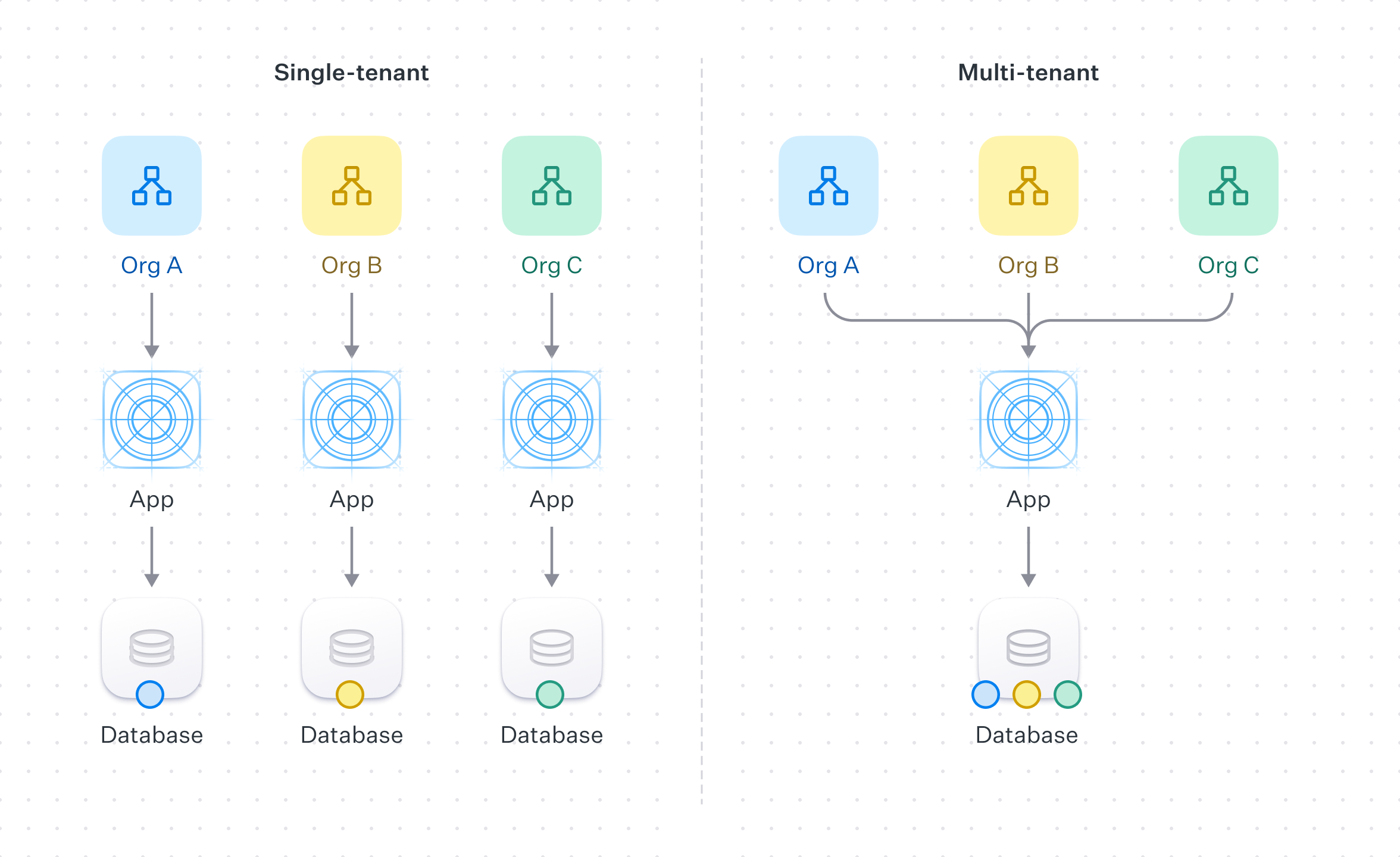
In the context of authentication and authorization, single-tenant refers to a software architecture where a separate instance of the software is set up for each client on separate servers or virtual machines.
Each organization is paired with its own instance of both the application and the underlying database. This approach offers full data isolation between customers, but comes at the cost of being more resource-intensive and costly. Each client’s setup may require separate maintenance, updates, and support.
Multi-tenant refers to a software architecture where a single instance of the software serves multiple customer organizations, known as tenants.
Each tenant’s data is isolated and remains invisible to other tenants because the software is designed to securely handle this data across all tenants.
In the context of WorkOS, a multi-tenant application could be accomplished by the use of Organizations and Organization Memberships to ensure that end-users only have access to the data they are authorized to.
By default WorkOS comes with two environments: staging and production. The former is for development and testing, the latter for live traffic. For single-tenant applications, new environments can be added to your WorkOS account to accommodate each of your users. For more information or to request new environments, please reach out to support.
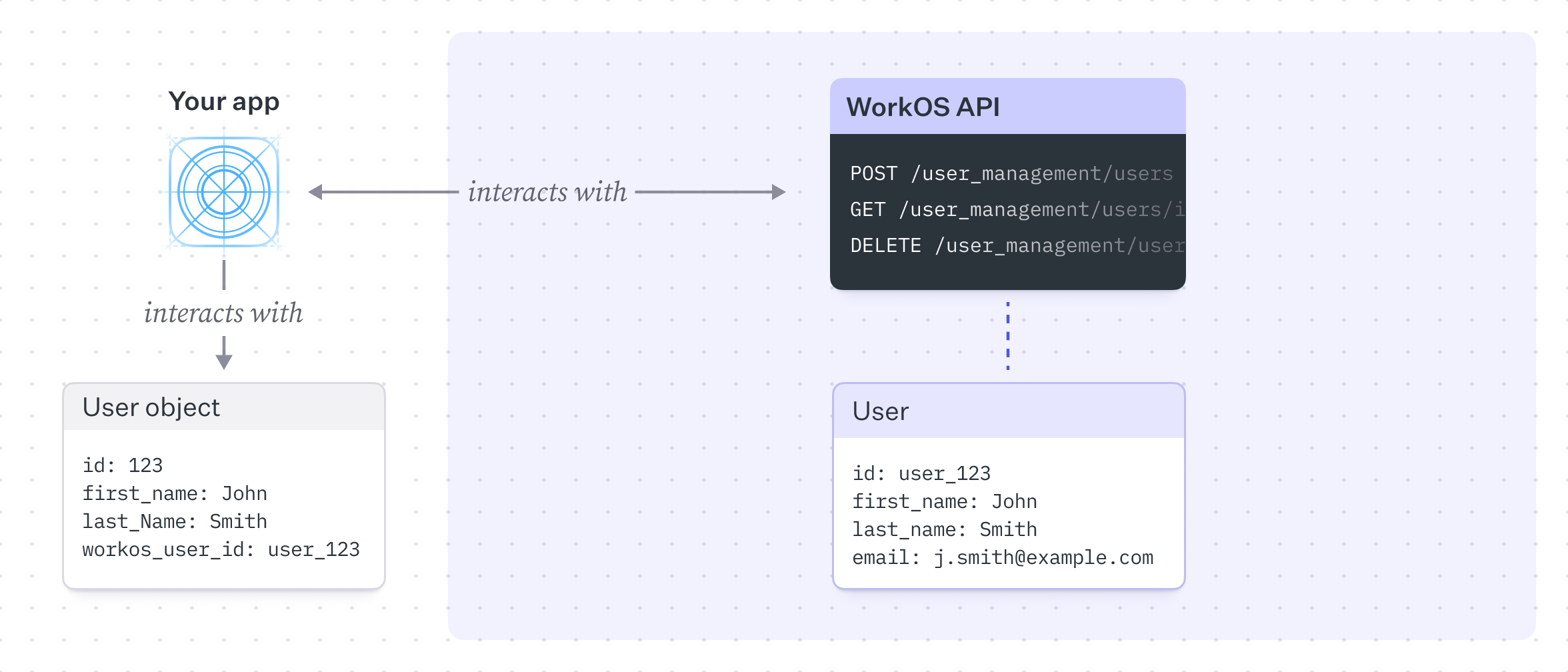
In a simple B2C model, all users belong to the application directly. Users do not require assignment or management by an organization to perform actions or access resources. The customer is also the end-user – they sign up or sign in to the app to use its services without being associated with an organization.
A common pattern is to maintain a single users table in the database linking to the WorkOS user. WorkOS can optionally serve as the source of truth for user information such as firstName, lastName, or email, though this depends on application requirements.
In this model, WorkOS’s primary role is to authenticate users and store them in a simple, flat structure. This is the default model and the simplest to implement. As requirements grow, additional functionality can be layered on.
In contrast to the B2C example, a typical B2B model introduces the concept of Organizations.
Organizations relate a set of users and provide a structure to manage and enforce authentication methods and resource access. We can extend our previous diagram to introduce this concept.
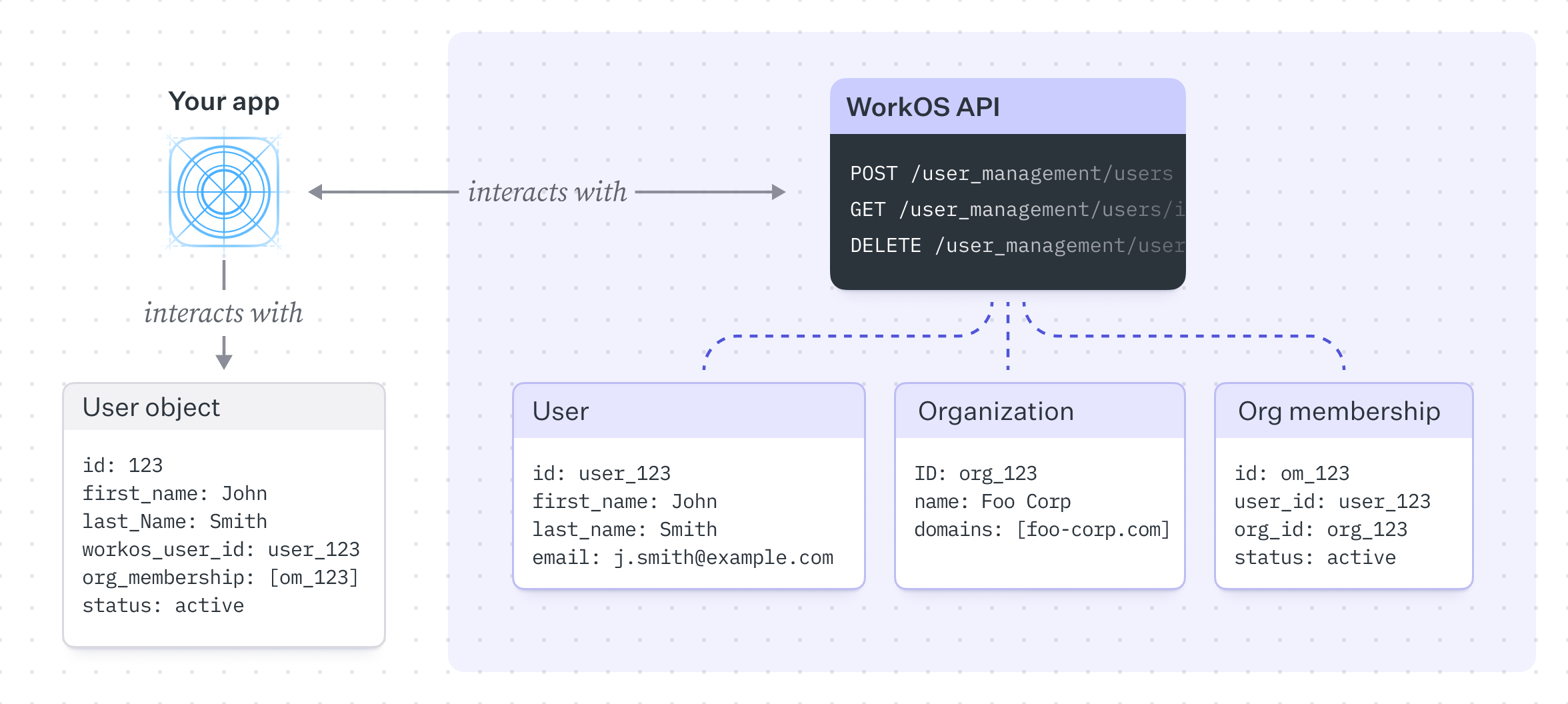
In this model, there is a many-to-many relationship between users and organizations – a user can belong to many organizations and an organization can have many users, expressed through the Organization Membership table. Unlike the B2C example, the customer here is a (usually enterprise) company that has its own users, typically employees or contractors.
While all the authentication methods outlined above work with B2B models, the main difference is that B2B tends to favor SSO as the authentication method of choice.
This model becomes powerful because it captures more complex scenarios. Features such as domain verification and domain policies can control authentication behavior and provision members automatically.
Domain verification is the process of proving ownership of a specific domain, typically handled by a company’s IT department. Once a domain is verified, all existing and future users with email addresses matching the domain are, by default, managed by the organization’s domain policy. This allows the organization to control authentication and membership behavior for these users, such as requiring these users to authenticate via SSO.
Users signing in with SSO with a verified email domain are automatically considered verified and do not need to complete the email verification process.
When onboarding a new enterprise customer, they will likely ask to integrate their SSO connection provided by their own Identity Provider (IdP) with your application.
The Admin Portal provided by WorkOS makes this process easy to implement by providing a hosted UI that guides your user through SSO configuration.
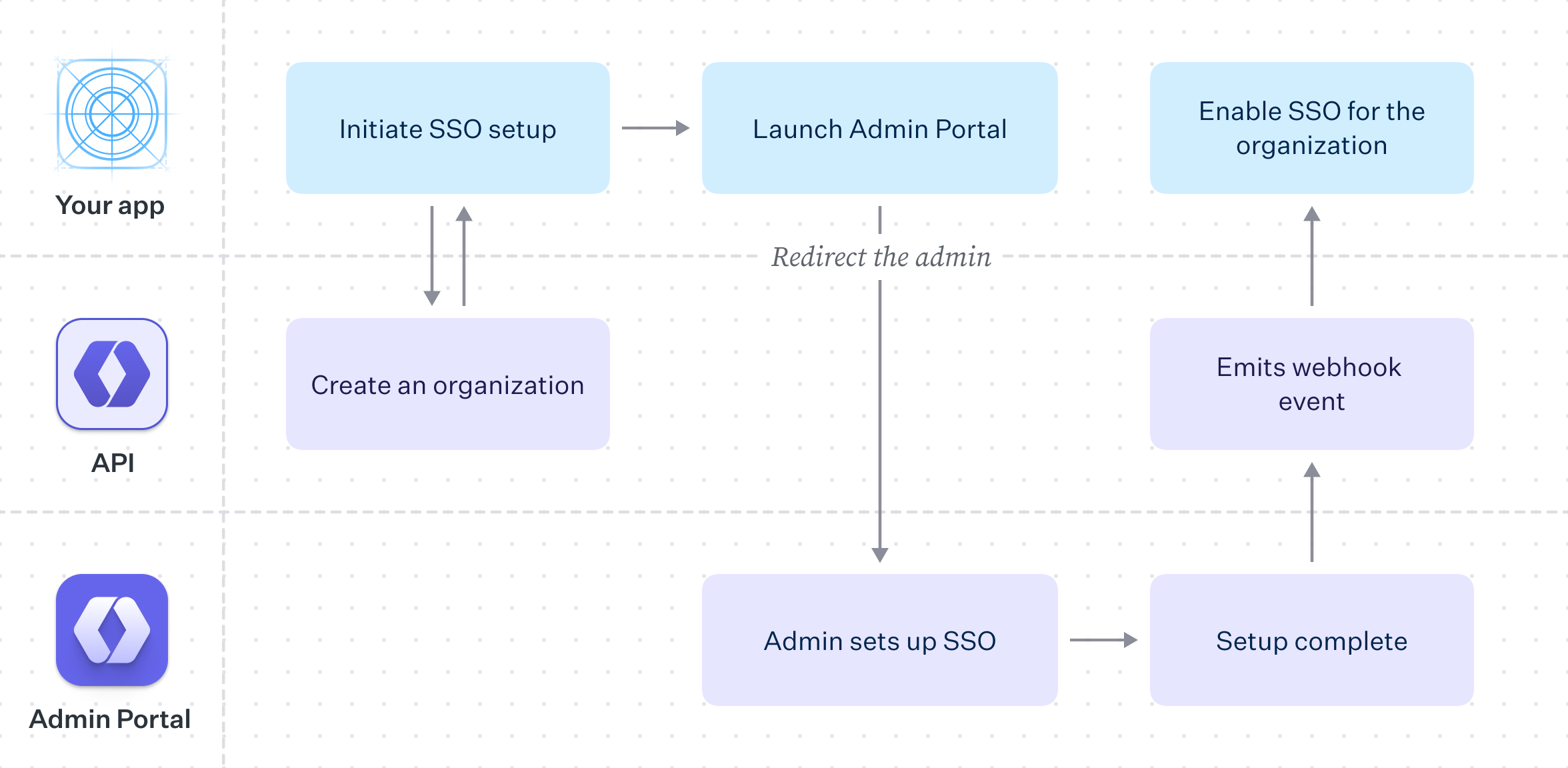
With the Admin Portal, the process of configuring your customer’s SSO integration is reduced to creating an Organization in WorkOS, saving relevant data in your own database and then redirecting the user to the Admin Portal to guide them through the configuration flow.
As with B2C models, user data on the WorkOS side can serve as the source of truth, but the far more common pattern is to store user information in a local database that links to the WorkOS user.
The AuthKit and SSO products can be used independently. SSO acts as authentication middleware and intentionally does not handle user database management. For applications that are uncertain which approach fits best, AuthKit is recommended – it provides the flexibility to add or remove features as needs evolve.
As an application grows, additional features are often needed to support customer requirements. AuthKit is designed with this progression in mind. Moving upmarket and onboarding larger customers is straightforward – new features can be adopted and extended within an established architecture. The following scenarios cover common use cases with specific feature sets.
- SSO with contractors – Enforcing Organization SSO with external guest members.
- Invite-only Signup – An invite only application that allows existing users to invite new members.
- AuthKit Quick Start – Add AuthKit to your app step-by-step
- Users and Organizations – How users, organizations, and memberships work
- Sessions – How access tokens and session lifecycle work
- How Identity Linking Works – How credentials and identities are linked